All
-
What is C#?
C# is pronounced as “See Sharp”. It is object oriented programming language developed by Microsoft which runs under .NET platform. Its syntax is similar to C++ or Java. It's most recent version C# 5.0 was released on August 15, 2012. It is widely used for developing web application, windows application, smart phone apps and games etc.
-
What is the advantage of C# over Java?
The advantageous features of C# over java are as follows.
C# offers cross language interoperability or mixed language programming (Java lacking).
C# directly supports windows operating system (Java lacking).
C# is component-oriented language integrated support for writing of software support.
C# support pointer as unsafe (Java lacking it).
-
Explain evolution history of C#?
The evolution history of C# is as follows:
C# 1.0
Managed Code
IDE - Visual Studio 2002, 2003
.NET Framework - 1.0, 1.1
C# 2.0
Generics
Static Classes
Partial types
Anonymous methods
Iterators
Nullable types
Asymmetric Property and Indexer Accessors
Delegate Inference
Covariance and Contra-variance
IDE - Visual Studio 2005
.NET Framework - 2.0
C# 3.0
Implicit types (var)
Partial Methods
Object and collection initializers
Auto-Implemented properties
Anonymous types
Extension methods
LINQ
Query expressions
Lambda expressions
Expression trees
IDE - Visual Studio 2008
.NET Framework - 3.5
C# 4.0
Dynamic binding
Named arguments
Optional Parameters
Generic Covariance and Contra-variance
COM Interop
IDE - Visual Studio 2010
.NET Framework - 4.0
C# 5.0
Asynchronous methods
Caller info attributes
IDE - Visual Studio 2012, 2013
.NET Framework - 4.5, 4.5.1
-
Explain the new features of C# 5.0?
The new features in C# 5.0 are given below:
Async Feature (Asynchronous Methods)
C# 5.0 Async feature introduces two keywords async and await which allows you to write asynchronous code more easily and intuitively like as synchronous code. Before C# 5.0, for writing an asynchronous code, you need to define callbacks (also known as continuations) to capture what happens after an asynchronous process finishes. This makes your code and other routine task such exception handling complicated.
Both the keywords are used in a combination of each other. Hence, an await operator is applied to a one or more than one expressions of an async method. An async method returns a Task or Task<TResult> that represents the ongoing work of the method. The task contains information that the caller of the asynchronous method can use, such as the status of the task, its unique ID, and the method's result.
public async Task<IEnumerable<Product>> GetProductList()
{
 HttpClient client = new HttpClient();
 Uri address = new Uri("http://dotnet-tricks.com/");
 client.BaseAddress = address;
 HttpResponseMessage response = await client.GetAsync("myservice/product/ProductList");
 if (response.IsSuccessStatusCode)
 {
 var list = await response.Content.ReadAsAsync<IEnumerable<Product>>();
 return list;
 }
 else
 {
 return null;
 }
}
Caller Information (Caller info attributes)
Caller Information can help you in tracing, debugging and creating diagnose tools. It will help you to avoid duplicate codes which are generally invoked in many methods for same purpose, such as logging and tracing.
You could get the following information of caller method:
CallerFilePathAttribute
Full path of the source file that contains the caller. This is the file path at compile time.
CallerLineNumberAttribute
Line number in the source file at which the method is called.
CallerMemberNameAttribute
Method or property name of the caller.
using System;
using System.Collections.Generic;
using System.Linq;
using System.Text;
using System.Threading.Tasks;
class Example
{
 static void Main(string[] args)
 {
 Console.WriteLine("Main method Start");
 InsertLog("Main");
 MyMethodB();
 MyMethodA();
 Console.WriteLine("Main method End!");
 Console.ReadLine(); // hold on result
 }
 static void MyMethodA()
 {
 InsertLog("MyMethodA");
 MyMethodB();
 }
 static void MyMethodB()
 {
 // some code here.
 }
 static void InsertLog(string method)
 {
 Console.WriteLine("{0} called MyMethodB at {1}", method,
 DateTime.Now);
 }
}
/* Output:
 Main method Start
 Main called MyMethodB at 11/17/2013 11:12:24 PM
 MyMethodA called MyMethodB at 11/17/2013 11:12:24 PM
 Main method End!
*/
In both Main and MyMethodA, method InsertLog is invoked for logging. Now we can change the above code as follows.
using System; using System.Collections.Generic; using System.Runtime.CompilerServices; using System.Text; using System.Threading.Tasks; class Example { static void Main(string[] args) { Console.WriteLine("Main method Start"); MyMethodB(); MyMethodA(); Console.WriteLine("Main method End!"); Console.ReadLine(); } static void MyMethodA() { MyMethodB(); } static void MyMethodB([CallerMemberName] string memberName = "", [CallerFilePath] string sourceFilePath = "", [CallerLineNumber] int sourceLineNumber = 0) { InsertLog(memberName); } static void InsertLog(string method) { Console.WriteLine("{0} called MyMethodB at {1}", method, DateTime.Now); } } /*Output: Main method Start Main called MyMethodB at 11/17/2013 10:30:11 PM MyMethodA called MyMethodB at 11/17/2013 10:30:11 PM Main method End! */ -
Explain the new features of C# 4.0?
The new features of C# 4.0 are given below:
Dynamic binding
This feature is derived from dynamic languages such as Python, Ruby and JavaScript which resolve the types and members at runtime instead of compile time.
dynamic d = "hello c#";
Console.WriteLine(d.ToUpper()); // HELLO C#
Console.WriteLine(d.Show()); // Compiles OK, but gives error at runtime
Optional parameters
In C# 4.0, methods parameters can be specified as optional by providing a default value. When the method having optional parameter is invoked, optional parameters can be omitted.
void Sum(int a, int b = 10)
{
 Console.WriteLine(a+b);
}
Above method can be called as:
Sum(5); // 15
Named arguments
In C# 4.0, any argument can be passed by parameter name instead of parameter position. The Sum() can be called as :
Sum(b:5,a:10); // 15
Type variance
C# 4.0, allows generic interfaces and generic delegates to mark their type parameters as covariant or contravariant. This enables the following code to work:
IEnumerable<string> str;
//TO DO: assign values to str
IEnumerable<object> obj = str;
COM specific interoperability features
Dynamic binding as well as named and optional arguments help making programming against COM less painful than today. On top of that, however, we are adding a number of other features that further improve the interoperability experience specifically with COM.
-
How C# code is executed?
C# code execution life cycle diagram is shown as follows:
-
What is Data Type?
Data Type refers to the type of data that can be stored in a variable. It also specifies how much memory would be allocated to a variable and the operations that can be performed on that variable.
C# is rich in data type which is broadly divided into two categories.
Value Type
Reference Type
-
What is value type and reference type?
Value Type
A value type variable store actual values. Also, value types are stored in a stack. Values types are of two types - built-in and user-defined. Value types are derived from
System.ValueType.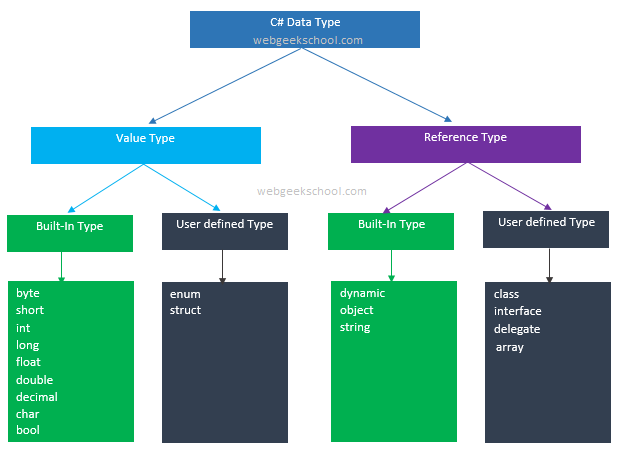
Reference Type
A reference type variable stores a reference to the actual value. It means reference type contains a pointer to another memory location that holds the actual data. Also, reference types are stored in a heap. Reference types are of two types - built-in and user-defined. Reference types are derived from
System.Object. -
What is dynamic type?
Dynamic type was introduced with C# 4.0. Dynamic types are declared with the dynamic keyword. Dynamic types bypass compile-time type checking and these operations are resolved at run time. During compilation, dynamic is converted to
System.Objectand compiler will emit the code for type safety during runtime.If the value provided to a dynamic variable is not valid, exception would be thrown at run time not at compile time.
class Program { public static void Main() { dynamic d = 1; //assigning integer Console.WriteLine(d); d = "Hi Dynamic"; //assigning string to the same variable d Console.WriteLine(d); d = TestData(); //assigning method result to the same variable d Console.WriteLine(d); // You can call anything on a dynamic variable, // but it may result in a runtime error Console.WriteLine(d.Error); } public static double TestData() { return 12.80; } } /* Out Put 10 Hi Dynamic 12.80 RuntimeBinderException was unhandled, 'double' does not contain a definition for 'Error' */ -
What is Nullable Type?
Value types (like int, bool etc.) which accept either their normal values or a null value are referred as Nullable types. Nullable types are instances of the
Nullablestruct.For example, A
Nullable<bool>is pronounced as "Nullable of bool," and it can accept the values true, false or null.Nullable types can also be defined using ? type modifier. This token is placed immediately after the value type being defined as nullable.
//assigning normal value Nullable
flag = true; //OR bool? flag = true; //assigning normal value Nullable x = 20; //OR int? x = 20; -
When to use Nullable Type?
When you deal with databases and other data types which contain elements or variables that may or not be assigned a value i.e. undefined, nullable types are used to store the values of such elements or variables.
-
Can you define string as Nullable Type?
You can’t declare a string as nullable because, it is implicitly nullable. Hence, declaring a string variable like
string? strNameresults a compile time error. -
What is the difference between int, Int16, Int32 and Int64?
In the learning phase developer are not much aware of the difference between primitive, FCL (framework class library), reference, and value types. This cause bugs and performance issues into the code. In this article, I would like to expose the different behavior of integer type.
int
It is a primitive data type defined in C#.
It is mapped to Int32 of FCL type.
It is a value type and represent System.Int32 struct.
It is signed and takes 32 bits.
It has minimum -2147483648 and maximum +2147483647 capacity.
Int16
It is a FCL type.
In C#, short is mapped to Int16.
It is a value type and represent System.Int16 struct.
It is signed and takes 16 bits.
It has minimum -32768 and maximum +32767 capacity.
Int32
It is a FCL type.
In C#, int is mapped to Int32.
It is a value type and represent System.Int32 struct.
It is signed and takes 32 bits.
It has minimum -2147483648 and maximum +2147483647 capacity.
Int64
It is a FCL type.
In C#, long is mapped to Int64.
It is a value type and represent System.Int64 struct.
It is signed and takes 64 bits.
It has minimum –9,223,372,036,854,775,808 and maximum 9,223,372,036,854,775,807 capacity.
Note
A number of developers think that int represents a 32-bit integer when the application is running on a 32-bit OS and it represents a 64-bit integer when the application is running on a 64-bit OS. This is absolutely wrong.
In C# int is a primitive data type and it always mapped to System.Int32 whether the OS is 32-bit or 64-bit.
-
What is the difference between constant, readonly and static?
Constant
Constant fields or local variables must be assigned a value at the time of declaration and after that they cannot be modified. By default constant are static, hence you cannot define a constant type as static.
public const int X = 10;
A const field is a compile-time constant. A constant field or local variable can be initialized with a constant expression which must be fully evaluated at compile time.
void Calculate(int Z)
{
 const int X = 10, X1 = 50;
 const int Y = X + X1; //no error, since its evaluated a compile time
 const int Y1 = X + Z; //gives error, since its evaluated at run time
}
You can apply const keyword to built-in value types (byte, short, int, long, char, float, double, decimal, bool), enum, a string literal, or a reference type which can be assigned with a value null.
const MyClass obj1 = null;//no error, since its evaluated a compile time
const MyClass obj2 = new MyClass();//gives error, since its evaluated at run time
Constants can be marked as public, private, protected, internal, or protected internal access modifiers.
Use the const modifier when you sure that the value a field or local variable would not be changed.
ReadOnly
A readonly field can be initialized either at the time of declaration or with in the constructor of same class. Therefore, readonly fields can be used for run-time constants.
class MyClass
{
 readonly int X = 10; // initialized at the time of declaration
 readonly int X1;
 public MyClass(int x1)
 {
 X1 = x1; // initialized at run time
 }
}
Explicitly, you can specify a readonly field as static since, like constant by default it is not static. Readonly keyword can be apply to value type and reference type (which initialized by using the new keyword) both. Also, delegate and event could not be readonly.
Use the readonly modifier when you want to make a field constant at run time.
Static
The static keyword is used to specify a static member, which means static members are common to all the objects and they do not tied to a specific object. This keyword can be used with classes, fields, methods, properties, operators, events, and constructors, but it cannot be used with indexers, destructors, or types other than classes.
class MyClass
{
 static int X = 10;
 int Y = 20;
 public static void Show()
 {
 Console.WriteLine(X);
 Console.WriteLine(Y); //error, since you can access only static members
 }
}
Key points about Static keyword
If the static keyword is applied to a class, all the members of the class must be static.
Static methods can only access static members of same class. Static properties are used to get or set the value of static fields of a class.
Static constructor can't be parameterized. Access modifiers can not be applied on Static constructor, it is always a public default constructor which is used to initialize static fields of the class.
-
What is the difference between var data type and anonymous type?
Var Type
var data type was introduced in C# 3.0. var is used to declare implicitly typed local variable means it tells the compiler to figure out the type of the variable at compilation time. A var variable must be initialized at the time of declaration.
Valid var statements
var str = "1";
var num = 0;
string s = "string";
var s2 = s;
s2 = null;
string s3 = null;
var s4 = s3;
At compile time, the above var statements are compiled to IL, like this:
 string str = "1";
int num = 0;
string s2 = s;
string s4 = s3;
Anonymous Type
An anonymous type is a simple class generated by the compiler within IL to store a set of values. var data type and new keyword is used to create an anonymous type.
var emp = new { Name = "Deepak", Address = "Noida", Salary=21000 };At compile time, the compiler will create an anonymous type, as follows:
 class __Anonymous1
{
 private string name;
 private string address;
 int salary; public string Name
 {
 get{return name; }
 set { name=value }
 }
 public string Address
 {
 get{ return address; }
 set{ address=value; }
 }
 public int Salary
 {
 get{ return salary; }
 set{ salary=value; }
 }
}
The anonymous type is very useful when you want to shape the result in your desired form like this:
 var result =from book in Books
 where book.Price > 200
 orderby book.IssueDate descending
 select new
 {
 Name = book.Name,
 IssueNumber = "#" + book.Issue
 };
In above example, I change the name of the “Issue” field of Book table to “IssueNumber” and add # before value to get desired output.